> For the complete documentation index, see [llms.txt](https://help.refractbot.com/llms.txt). Markdown versions of documentation pages are available by appending `.md` to page URLs; this page is available as [Markdown](https://help.refractbot.com/online-dashboard/subscription/instances.md).
# Instances
An instance is one licensed copy of Refract. Extra instances let you scale beyond a single bot. This page covers the rules, the two instance modes, and how to add or remove instances.
{% hint style="danger" %}
**Account sharing is not allowed.** A second instance is for you, for example to run Refract on a second computer or server at the same time. It is not a copy for a friend: there is no second key or login, everything runs under your one account, and we will not invite your friend to the server as part of an instance purchase.
{% endhint %}
## The rules
* **One instance per device.** A device runs one copy of Refract, period. You cannot run 2 instances on the same machine; a second instance means a second computer or server.
* **The instance cap is 2.** The cap may change at any time, with or without notice.
* **All instances renew at the same exact time, on the same renewal plan.** You cannot mix plans across instances.
* **The first time you add an instance, it is prorated** until your next renewal date. You pay the prorated amount today, and from then on everything renews together.
* **Each instance costs the same as your plan's per-month rate**, billed on your plan's schedule. See [What an instance costs](#what-an-instance-costs) below.
## What an instance costs
An extra instance costs the same per month as your plan's rate, so a second instance on the 1 Month plan is **$50 per month**:
| Your plan | Cost per extra instance |
| --------- | ------------------------------- |
| 1 Month | $50 / mo |
| 3 Month | $45 / mo ($135 per 3 months) |
| 6 Month | $42.50 / mo ($255 per 6 months) |
| 12 Month | $40 / mo ($480 per year) |
The first time you add one, you pay a prorated amount today covering the time left in your current cycle, and after that the instance renews together with the rest of your subscription. Pricing is current as of this writing and may change; the [Subscription](/online-dashboard/subscription.md#renewal-plans) page has the full plan table.
{% hint style="warning" %}
**Grandfathered instances do not come back.** Some longtime users have more than 2 instances from before the cap. If you are grandfathered and downgrade your instance count, you cannot go back above the current cap of 2. For example, if you have 3 instances and drop to 2, you can never go back up to 3. Lowering a grandfathered count is permanent.
{% endhint %}
## Choose your mode
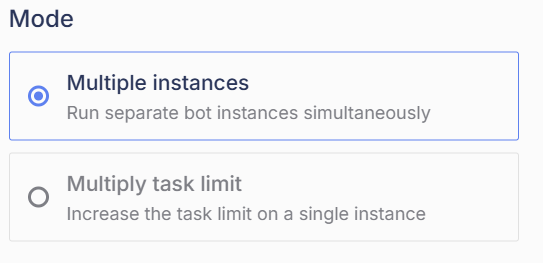
When you add an instance, you choose what the extra capacity does. We recommend **Multiple instances**.
Multiple instances is the mode we recommend.
* **Multiple instances (recommended):** you get separate copies of Refract running simultaneously, each with the normal task limit.
* **Multiply task limit:** you stay on one instance, and its task limit is multiplied instead.
Concrete example with Walmart, which has a 2,000 task limit per instance. You pay for a second instance:
| Mode | What you get |
| ------------------- | ----------------------------------------- |
| Multiple instances | 2 instances, each with a 2,000 task limit |
| Multiply task limit | 1 instance with a 4,000 task limit |
{% hint style="info" %}
**A new instance starts empty.** Profiles (including card info), accounts, proxies, and settings are not carried over between instances, but moving them is easy: export from your current instance and import on the new one, or use App Data export/import in Settings to move everything at once. See [Settings](/general-setup/settings.md#move-everything-to-a-new-device).
{% endhint %}
## Add an instance
{% stepper %}
{% step %}
#### Open the Subscription page
Go to [dashboard.refractbot.com/subscription](https://dashboard.refractbot.com/subscription) and click **Edit instances**.
{% endstep %}
{% step %}
#### Set the quantity
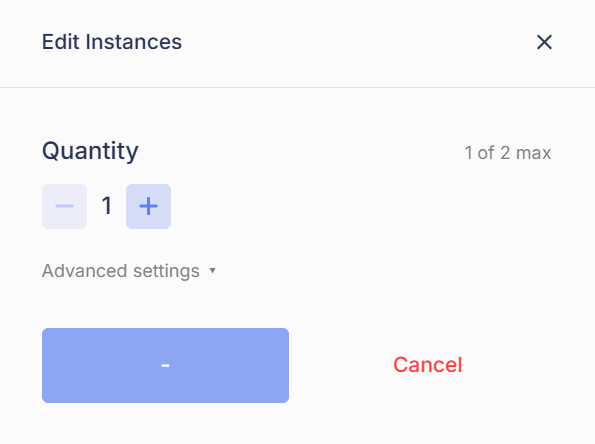
Use the plus and minus buttons to set your instance count. The panel shows your current count against the cap.
The quantity selector shows your count against the current cap.
{% endstep %}
{% step %}
#### Review the charge
The **Charge Today** box shows the prorated amount for the time remaining in your current billing cycle. This is what keeps all instances renewing on the same date.
{% endstep %}
{% step %}
#### Pick the mode and pay
Select **Multiple instances** or **Multiply task limit**, then click **Pay**.
{% endstep %}
{% endstepper %}
{% hint style="success" %}
Once paid, the new capacity is active and your Subscription page shows the updated instance count. Everything renews together on your next renewal date.
{% endhint %}
## Adding an instance while on a longer plan
Because all instances must be on the same plan, you cannot add a month-to-month instance while the rest of your subscription is on a 3, 6, or 12-month plan. If you want your instances month-to-month:
{% stepper %}
{% step %}
#### Downgrade to the 1-month plan
Use **Change renewal plan** to move back to the 1 Month Subscription. Prorated credit for your unused time is applied.
{% endstep %}
{% step %}
#### Add the new instance
Once you are on the 1-month plan, add the instance as normal. Everything now renews monthly, together.
{% endstep %}
{% endstepper %}
---
# Agent Instructions
This documentation is published with GitBook. GitBook is the documentation platform designed so that both humans and AI agents can read, navigate, and reason over technical content effectively. Learn more at gitbook.com.
## Querying This Documentation
If you need additional information that is not directly available in this page, you can query the documentation by asking a question.
Perform an HTTP GET request on the following URL with the `ask` and `goal` query parameters:
```
GET https://help.refractbot.com/online-dashboard/subscription/instances.md?ask=&goal=
```
`ask` is the immediate question: it should be specific, self-contained, and written in natural language.
`goal` is what the user is ultimately trying to achieve, the reason they need the answer. Sharing it helps GitBook give you a better, more relevant answer. A goal is most helpful when it describes the outcome the user wants rather than restating the question. For example, with `ask=how do I create an API token`, a goal like `automate deployments from our CI pipeline` lets GitBook tailor the answer to that use case.
The response will contain a direct answer to the question and relevant excerpts and sources from the documentation.
Use this mechanism when the answer is not explicitly present in the current page, you need clarification or additional context, or you want to retrieve related documentation sections.