> For the complete documentation index, see [llms.txt](https://help.refractbot.com/llms.txt). Markdown versions of documentation pages are available by appending `.md` to page URLs; this page is available as [Markdown](https://help.refractbot.com/modules/target/target-setup-guide.md).
# Target Setup Guide
Target is the most complex site Refract supports. On top of the usual accounts, profiles, and proxies, Target requires cookies to pass Shape (its anti-bot system), which means running a cookie harvester alongside your tasks. This guide builds the setup step by step.
{% hint style="danger" %}
**Follow this guide before customizing anything.** If you do not at least make an attempt to follow it, we will not be able to help you.
{% endhint %}
## Recommended setup
Target has become a submit order lottery. With the DCO (High Demand) rate limits, you have to cart a ton of tasks and spam submit order to push an order through, and only about 1% of carts turn into an order. 10 tasks does not cut it. Run at a competitive size from the start:
* **Windows: 30-50 tasks**, on 30-50 unique Target accounts, one task per account per product.
* **Mac: 200+ tasks**, on 200+ unique Target accounts, one task per account per product. Local or a Mac mini server.
* Your local machine if you can, a Mac if you have one. A Mac mini server scales the same as a local Mac mini; it just needs proxies. Windows servers are not worth running for Target. See [How many tasks to run](#how-many-tasks-to-run).
* [In-bot cookie harvesters](/modules/target/in-bot-shape-generation.md), not the browser extension. Mix Chromium browsers: one on Chrome, one on Brave (set the [Brave browser](https://brave.com/) path on the Brave one), and add more as you need them. Safari and Firefox are not supported. You can reuse the same browser path on as many harvesters as you want; the bot handles profiles and cache automatically, with no extra setup on your side. Scale the harvester count so you hold about 3 cookies per running task.
* Residential proxies on tasks and especially on harvesters. ISPs on the monitor, with at least 1 proxy per monitor input when running multi-SKU. See [Proxies](#proxies).
* Multi-SKU on.
* Experiment with task and monitor delays. Some users run as low as 1000, some as high as 4000; find what works for your machine.
{% hint style="warning" %}
**10 tasks does not cut it on Target.** The median running task count is 12, which is not competitive. Windows setups should be 30-50 tasks. Mac setups should be 200+.
{% endhint %}
## The build order
You will do six things, in this order. Steps 1-2 are the same as every other site:
1. [Add your accounts](/general-setup/accounts.md) and group them. Do not log them in from the Accounts tab.
2. [Create your profiles](/general-setup/profiles.md), one unique profile per task.
3. [Create a Target task group](/general-setup/task-creation/task-group-creation.md) and set the monitor input (see [Monitor Setup](#monitor-setup) below).
4. Create your tasks (see [Task Creation](#task-creation) below).
5. Set up your [in-bot cookie harvesters](/modules/target/in-bot-shape-generation.md).
6. Start your tasks and harvesters, and keep the harvesters running as long as tasks run (see [Log in your accounts](#log-in-your-accounts) below).
## How many tasks to run
Target has become a submit order lottery. With the DCO (High Demand) rate limits, you cart a ton of tasks and spam submit order to push an order through, the same as every bot, and only about 1% of carts turn into an order. The median running task count is 12, which is not competitive; the people hitting double digits in cook groups are running hundreds if not thousands of tasks. See [Rate Limit (High Demand)](/modules/target/target-release-guide.md#rate-limit-high-demand).
The in-bot harvester has made big strides, and people are now running 200+ tasks without issues scaling, especially on macOS. Your device decides how far you can go, which is why serious Target setups run on a Mac, and why Windows servers are still really bad for Target:
| Device | How many tasks | Why |
| --------------- | ----------------- | ---------------------------------------------------------------------------------------- |
| Mac mini, local | 200+ | Macs share a common hardware fingerprint, so one Mac looks like every other Mac to Shape |
| Mac mini server | 200+ | Identical hardware to a local Mac mini, so it scales the same way |
| Windows, local | 30-50 | Windows gets flagged considerably faster than macOS |
| Windows server | Not worth running | Heavily flagged. A Windows VM's faked hardware is obvious to Shape |
{% hint style="info" %}
**A Mac mini server is just a Mac mini hosted in a datacenter.** Same hardware and same fingerprint as one sitting on your desk, and it scales the same way. The only practical difference is that it has no home IP, so a residential proxy list is not optional there. See [Proxies](#proxies).
{% endhint %}
At these sizes:
* One task per account per product, running the [in-bot harvester](/modules/target/in-bot-shape-generation.md). More tasks means more accounts.
* Scale your harvester count to hold about 3 cookies per running task. At 50 tasks that is around 150 cookies banked, and at 200 tasks around 600. Keep it at about 3 per task; piling up far more than that per task raises your flag risk.
* Harvesting on residential proxies has been helping pass Shape at these sizes.
* Watch your cart rate as you add tasks and harvesters.
{% hint style="warning" %}
**Do not expect 100% success, and do not overreact to blocks.** Shape on a drop has an extremely low pass rate, for everyone. That is the nature of the site, not a broken setup. When troubleshooting, look at your device, browser, and proxies, never the accounts.
{% endhint %}
## Proxies
At the recommended sizes, use residential proxies on tasks and harvesters:
| Your setup | Tasks and harvesters | Monitor |
| ----------------------------------------- | -------------------------------------------------------------------------------- | -------------------------------------- |
| Local machine (Windows 30-50 or Mac 200+) | Residential proxies, on harvesters above all | ISPs, 1 per monitor input on multi-SKU |
| Any server, including a Mac mini server | Residential proxies, always. A datacenter machine has no home IP to fall back on | ISPs |
The rule behind every row is the same: Shape wants to see a normal residential connection. Residential proxies are the closest substitute for a home IP, and resis have been passing Shape far better than ISPs. A couple of local harvesters can generate on your home IP because it is already residential, but that is not a substitute for running 30-50 tasks on Windows or 200+ on a Mac.
{% hint style="info" %}
**Harvester proxies matter most.** Tasks present the harvester proxy to Shape for add to cart and login, so the harvester's proxy quality carries your whole setup. Harvesters and tasks do not need matching proxies.
{% endhint %}
## How Target is different
* **Two kinds of cookies:** login cookies (to log accounts in) and add-to-cart cookies (to cart Shape-protected products). Both come from the in-bot harvester.
* **Tasks use the harvester proxy** for add to cart and login. Whatever proxies your in-bot harvesters run on are the proxies your tasks present to Shape.
* **On drops, checking out is the hard part, not carting.** Target's high-demand rate limits hit every bot, so tasks keep submitting the order to force it through. A task sitting on **Submitting Order** is doing exactly that. See the release guide's [Rate Limit (High Demand)](/modules/target/target-release-guide.md#rate-limit-high-demand).
* **Refract always checks out with the profile info in the bot.** You do not need to add your shipping address or card to the Target account yourself, or with another tool. On task start, Refract makes sure the profile's info is on the account and set as the default for checkout.
* **Everything known about Shape is in the release guide.** Opening a ticket will not get you more; if we knew more, it would be written there.
{% content-ref url="/pages/ZFqpmTnmbrPInDm80k4P" %}
[Target Release Guide](/modules/target/target-release-guide.md)
{% endcontent-ref %}
## Prerequisites
* Target accounts: one task per account per product. The same accounts can be run more than once across products or multi-SKU.
* Unique profiles, one per task.
* Proxies: ISPs on the monitor. Residential (resi) on tasks, and especially on harvesters. Yes, resis use data, but they have been passing Shape much better.
* A Mac if you have one. Mac is best for Shape: run 200+ tasks on a Mac, local or as a Mac mini server. Local Windows should be 30-50 tasks. Avoid Windows servers for Target if at all possible.
* The in-bot harvester set up:
{% content-ref url="/pages/EjaxLfBYQeNORImXRI1L" %}
[In-Bot (Shape Generation)](/modules/target/in-bot-shape-generation.md)
{% endcontent-ref %}
## Monitor Setup
The monitor input is the product's TCIN, the number from the product URL. A URL will not work. Use ISP proxies on the monitor.
```
https://www.target.com/p/local/A-81114595 → monitor input: 81114595
```
**Multi-SKU is preferred on Target.** With Use Multi Input on, add one product per line, with an optional price cap:
```
81114595
94631752;120
```
{% hint style="danger" %}
**The price cap must be a whole dollar amount. Cents are not supported.** Write `120`, not `119.99`. Round up to the next whole dollar.
If you put cents in the price cap, the task never picks the product up. It looks like it is running fine, it just never activates.
{% endhint %}
You can run the same accounts more than once for Target, but multi-SKU beats duplicating task groups: every group you duplicate doubles the cookies you need, since each running task should have 3 cookies banked. In numbers: 50 tasks in 1 group need 150 cookies. Duplicate that group and you have 100 running tasks needing 300 cookies. A third group makes it 450. Multi-SKU covers the same products with the original 150, and the more cookies you generate, the higher the likelihood you get flagged and Shape blocked.
## Task Group Settings
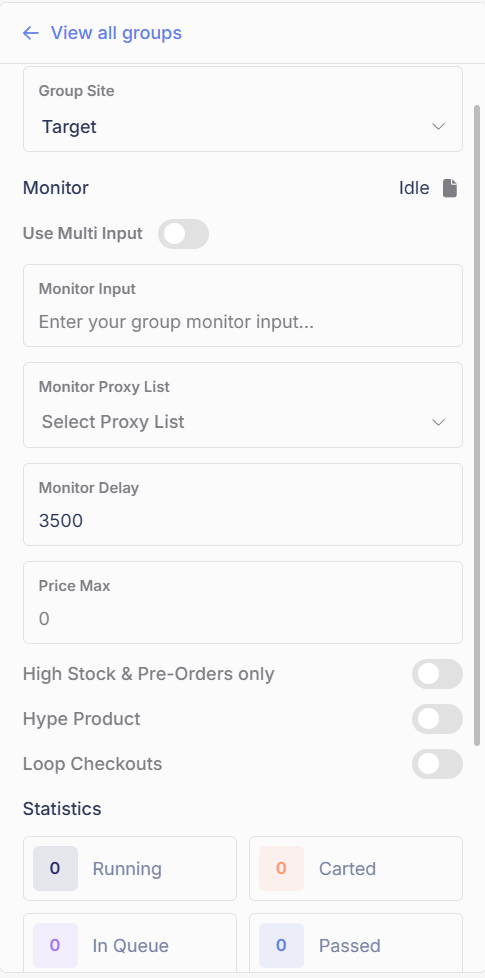
The Target group panel. Hype Product ON for every Shape-protected drop.
| Setting | Value | Notes |
| ---------------------------- | -------------------------------- | -------------------------------------------------------------------------------------------------------------------------------------------------------- |
| Use Multi Input | Preferred for multiple products | Formats above |
| Monitor Input | The product's TCIN | See [Monitor Setup](#monitor-setup) |
| Monitor Proxy List | Your ISP list | |
| Monitor Delay | `3500` (default) | |
| Price Max | Leave blank | Max price of 1 item, before tax and shipping. Blank means no cap. Whole dollars only: round up, no cents |
| High Stock & Pre-Orders only | OFF | ON makes the bot only go for high-stock items (10+ in the stock count) and pre-orders. Leave off by default, including for a normal potential restock |
| Hype Product | **ON for Shape-protected drops** | Required for all high-demand drops (cards, consoles, and similar). To test if a product is protected, run a task without it; if blocked, it is protected |
| Loop Checkouts | OFF | Optional, at your own risk; may increase flags and cancels. With multi-SKU it loops the same product until OOS, then moves to the next |
## Task Creation
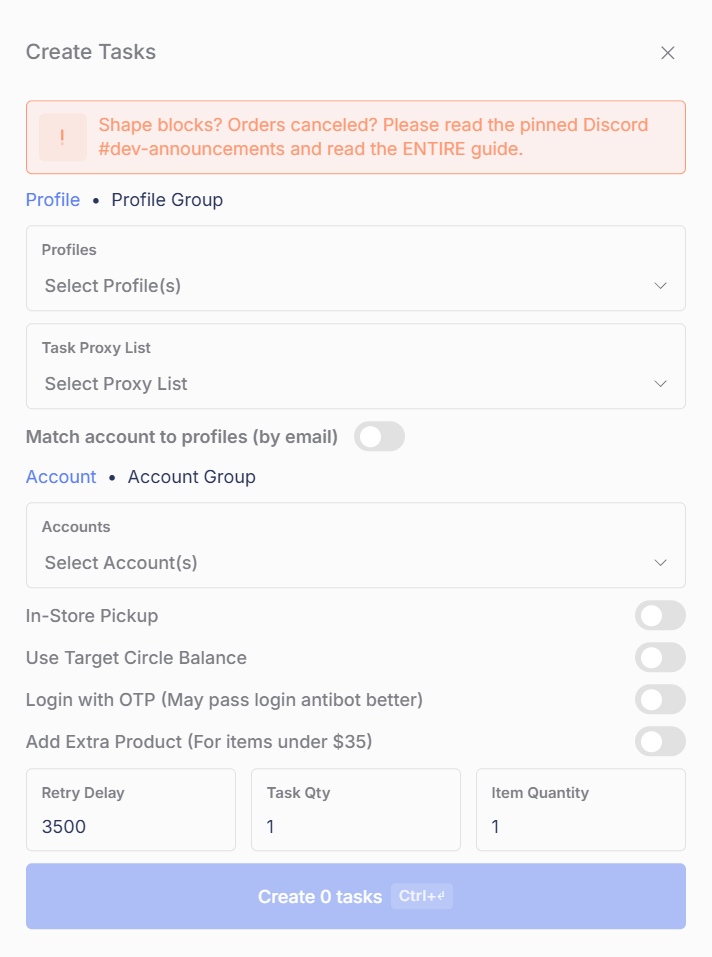
The Target Create Tasks window.
**Required fields:**
| Setting | Value | Notes |
| --------------- | --------------------- | -------------------------------------------------------------------------------------------------------------------------------------------------------------------------------- |
| Profiles | Your Profile Group | One unique profile per task |
| Task Proxy List | Your residential list | Resis have been passing Shape much better. Leave blank for localhost (not recommended) |
| Accounts | Your Account Group | Every task needs an account |
| Retry Delay | `3500` (recommended) | Experimenting with lower delays is fine; defaults are the baseline |
| Task Qty | `1` | Tasks per profile. How far you can scale depends on your device: 200+ on a Mac, 30-50 on local Windows. See [How many tasks to run](#how-many-tasks-to-run) |
| Item Quantity | `1` | A ceiling, not an exact number: the task goes for the max it can get, up to what you set. See [How Item Quantity works](/general-setup/task-creation.md#how-item-quantity-works) |
**Optional fields:**
| Setting | Notes |
| ------------------------------------ | --------------------------------------------------------------------------------------------------------------------------------------------------------------------------------------------------------------------------------------------------------------------------------------------------------------------------------------------------------------------------------------------------------------------------------------------- |
| Match account to profiles (by email) | Pairs accounts to profiles with the same email |
| In-Store Pickup | Required for in-store-only products |
| Use Target Circle Balance | Uses rewards at checkout if available |
| Login with OTP | Logs in with a code sent to the account email; may pass login antibot better. Pair it with [IMAP](/misc./imap.md) or enter codes in the pop-up |
| Add Extra Product | Needed for items under $35: Refract only checks out with free shipping, and Target's free shipping needs a $35+ cart (tasks show "Product Not Supported" without it). Adds a filler product (set a custom item, like a Lego set) and cancels JUST THE LEGO after checkout. Set the item yourself; left blank the bot picks a cheap one that may not clear $35. Also designed to help with Item Demand cancels; how much that helps is unknown |
## Log in your accounts
Do not log in from the Accounts tab. Target accounts log in with cookies:
{% stepper %}
{% step %}
#### Create and start your tasks
Tasks will sit on **Waiting for Cookies (Login)**. That is your cue to harvest.
{% endstep %}
{% step %}
#### Start your in-bot harvesters
Start your [in-bot harvesters](/modules/target/in-bot-shape-generation.md). They generate both cookie types, login and add to cart. Tasks log in and move on as login cookies arrive.
Optionally use **Login with OTP** (with IMAP) for the lowest-security login path. If you are Shape blocked on login, turn it on: see [Shape blocked on login?](#shape-blocked-on-login)
{% endstep %}
{% step %}
#### Keep the harvesters running
Keep your harvesters running as long as tasks run: every add-to-cart attempt uses a cookie. First-time logins and accounts needing a profile update will show **Waiting for Cookies (Product)** until add-to-cart cookies arrive.
{% endstep %}
{% endstepper %}
{% hint style="info" %}
**Task logins last days or weeks.** Logging in from the Accounts tab is not recommended and produces much shorter sessions.
{% endhint %}
### Shape blocked on login?
Turn on **Login with OTP (May pass login antibot better)** in your task settings. It logs in with a code sent to the account email, a lower-security path than a password login. Pair it with [IMAP](/misc./imap.md) so the codes are entered for you, or enter them in the pop-up.
Otherwise, the same principles as add-to-cart blocks apply:
* **Take login really slowly.** Do not try to log every account in at once. Stagger it, and let blocks cool off instead of hammering.
* **Do not use a Windows server.** Log in from a Mac or your local machine.
* **Use in-bot harvesters** for your login cookies.
* **Try different browser types** on your in-bot harvesters: Chrome, Brave, Edge, or another Chromium browser. Safari and Firefox are not supported. You can reuse the same browser path; the bot handles profiles and cache. See [Finding the browser executable](/modules/target/in-bot-shape-generation.md#finding-the-browser-executable).
* **Harvest on residential proxies.** A couple of local harvesters can generate on your home IP; at 30-50 or 200+ tasks, use resis. See [Proxies](#proxies).
## Cookies: the rules that matter
* **There is no one-size-fits-all fix for Shape blocks.** Shape scores your whole setup (device, browser, proxies, cookie volume, and the product's security level) together. What fixes one user's blocks does nothing for another's.
* **Target: about 3 cookies banked per running task.** That is per task, so your bank grows as you add tasks: 50 tasks need about 150, 200 tasks need about 600. What raises your flag risk is piling up far more than 3 per task, not running more tasks.
* **Bad cookies do not cart.** If you are not carting with 3 cookies per task, more bad cookies will not fix it. Improve the setup (device, browser, proxies) instead. This is about cookies only: you still need a lot of tasks.
* **Harvest on any in-stock product.** It does not matter what product you harvest on, as long as it is in stock and available for shipping. If harvesting suddenly stops producing cookies, the product you are harvesting on went out of stock; move to a new in-stock product.
* **Use the in-bot harvester.** The browser extension still connects to the bot, but it is deprecated: no longer updated, not recommended, and not covered by these guides. In-bot is far ahead of it on Target.
## FAQ
How many accounts do I need for Target?
More than most people run. 10 tasks does not cut it anymore: Target is a submit order lottery, and only about 1% of carts turn into an order. The median running task count is 12, which is not competitive. Run 30-50 tasks on local Windows, or 200+ on a Mac, local or as a Mac mini server. Windows servers are still really bad for Target: more accounts on a Windows server will not fix that. See [How many tasks to run](#how-many-tasks-to-run).
Why do my tasks say "Waiting for Cookies" or "Waiting for Cookies (Login)"?
You are not generating that type of cookie, or tasks are consuming cookies as fast as they arrive while getting blocked. Waiting for Cookies (Login) needs login cookies; Waiting for Cookies (Product) needs add-to-cart cookies. Check your [in-bot harvesters](/modules/target/in-bot-shape-generation.md) are running.
One task loops on Shape block while others sit on Waiting for Product. Is the account blocked?
No. Shape blocks are not account-related. That task likely needs to re-add customer information, which is Shape-protected; the others already had it. It is completing an extra step, nothing more.
Do I need login proxies?
Only if you log in from the Accounts tab, which is not recommended. Otherwise login uses the harvester proxy.
What does error 401 mean in my Target logs?
A Shape block.
What does "Product Not Supported" mean?
Hover over the status to see the reason. The message reads "Shipping not available for this product (Target $35+ restriction)".
Refract only checks out with free shipping on Target, and Target's free shipping needs a $35+ cart. So a product under $35 cannot check out on its own: cheap products like Needohs will always show this status by themselves.
The fix is **Add Extra Product**: enable it on your tasks and set a custom filler item, like a Lego set, to bring the cart over $35. The filler is cancelled right after checkout, so you only keep the product you wanted.
Set the filler item yourself rather than leaving it blank. Left blank, the bot picks a cheap item, which is the right behaviour when Add Extra Product is being used for cancel help but does not necessarily get you over $35.
What does "Cart in Use" mean?
The account's cart is in use by another task. Let the task retry on its own.
What does "review hold" mean?
Target is reviewing the order. Roughly a 50/50 chance it does not get cancelled.
Why do I get "product not found" when the product is in stock?
If a product is truly in stock and the bot or your harvester browser shows product not found or unavailable, that is a proxy rate limit.
What does "Rate Limited (Order)" mean?
Target rate-limits checkouts to prevent backend spam. It is unrelated to your proxies or accounts; let the task retry. For the drop-time version of this, see the release guide's Rate Limit (High Demand) section.
Why is my task stuck on "Submitting Order"?
On high-demand drops, Target's rate limits force every bot to keep submitting the order to push it through. A task sitting on **Submitting Order** is doing exactly that. Leave it running. See the release guide's [Rate Limit (High Demand)](/modules/target/target-release-guide.md#rate-limit-high-demand) section.
What does "Max attempts reached" mean while harvesting login cookies?
You are likely Shape blocked. Rest and improve the setup rather than hammering. See [Shape blocked on login?](#shape-blocked-on-login)
I'm Shape blocked on login. What do I do?
Turn on **Login with OTP (May pass login antibot better)** in your task settings, paired with IMAP. Otherwise the same principles apply: take login really slowly, do not use a Windows server, use in-bot harvesters, try different browser types on them, and harvest on residential proxies. See [Shape blocked on login?](#shape-blocked-on-login)
Can the bot reset my Target account's password?
Not currently.
What proxies should I use on Target?
Residential on tasks, and especially on harvesters. Resis use data, but they have been passing Shape much better. Keep ISPs on the monitor.
Will the bot adjust quantity if the max allowed is lower than what I set?
Yes. If you request 4 and Target allows 2, the bot goes for 2.
---
# Agent Instructions
This documentation is published with GitBook. GitBook is the documentation platform designed so that both humans and AI agents can read, navigate, and reason over technical content effectively. Learn more at gitbook.com.
## Querying This Documentation
If you need additional information that is not directly available in this page, you can query the documentation by asking a question.
Perform an HTTP GET request on the following URL with the `ask` and `goal` query parameters:
```
GET https://help.refractbot.com/modules/target/target-setup-guide.md?ask=&goal=
```
`ask` is the immediate question: it should be specific, self-contained, and written in natural language.
`goal` is what the user is ultimately trying to achieve, the reason they need the answer. Sharing it helps GitBook give you a better, more relevant answer. A goal is most helpful when it describes the outcome the user wants rather than restating the question. For example, with `ask=how do I create an API token`, a goal like `automate deployments from our CI pipeline` lets GitBook tailor the answer to that use case.
The response will contain a direct answer to the question and relevant excerpts and sources from the documentation.
Use this mechanism when the answer is not explicitly present in the current page, you need clarification or additional context, or you want to retrieve related documentation sections.